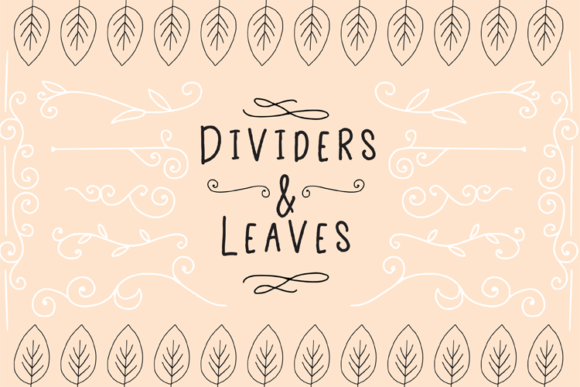
Dividers and Leaves for Creative Design
Whether you're designing stationery, creating digital assets, or preparing materials for die cutting, Dividers and Leaves offers a versatile collection of hand-drawn elements that elevate your projects. These intricate designs are perfect for adding visual interest to text, enhancing layouts, and crafting eye-catching die cuts. With compatibility across major design applications and die-cutting machines, this resource is ideal for professionals and hobbyists alike.
What Are Dividers and Leaves?
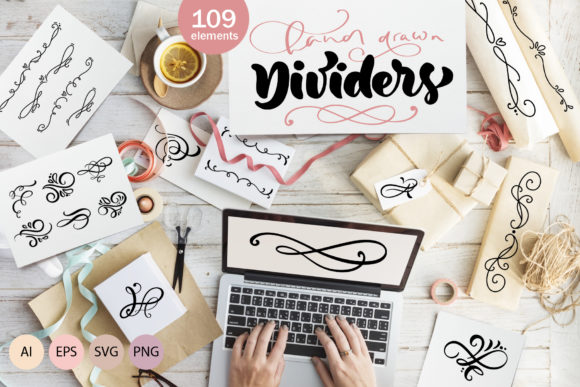
Dividers and Leaves is a curated set of decorative elements designed to enhance both digital and physical projects. The collection includes 151 individual PNG files, DXF files, and vector formats such as Illustrator (.ai), EPS, and SVG. These elements are inspired by nature, featuring leaves, branches, and dividers that can be used creatively in various contexts.
Each element is crafted with precision, making them suitable for use in graphic design, print media, and even DIY craft projects. Their hand-drawn appearance gives them a unique charm that machine-generated graphics often lack.
Why Choose Dividers and Leaves?
- Versatility: These elements work seamlessly in both digital and physical formats, making them adaptable to a wide range of creative needs.
- High Quality: Available in multiple file formats, including vector-based options, ensures scalability without loss of quality.
- Compatibility: Works with popular design tools like Adobe Illustrator, Inkscape, CorelDRAW, and die-cut machines such as Cricut and Silhouette.
- Creative Freedom: Offers endless possibilities for personalization and customization to suit any project's aesthetic.
Practical Applications Across Industries
The beauty of Dividers and Leaves lies in its ability to adapt to different industries and purposes. Here are some real-world examples of how these elements can be applied:
Personal Use
For personal projects, such as creating custom greeting cards, scrapbooking, or handmade calendars, the leaf and divider elements add a natural and elegant touch. You can use them to frame quotes, separate sections, or create borders around important text.
Professional and Commercial Use
Businesses looking to enhance their branding can benefit from using these elements in marketing materials, packaging, and promotional items. A floral divider could be used in a brochure to separate sections, while a leaf border might be incorporated into product packaging for an organic feel.
Education and Publishing
Educators and publishers can use Dividers and Leaves to make learning materials more engaging. Textbooks, workbooks, and educational posters can include these elements to break up content, highlight key points, and add visual appeal.
Bloggers and content creators may also find these elements useful when designing infographics, headers, or social media posts that stand out visually.
Enhancing User Experience and Communication
Incorporating Dividers and Leaves into your design can significantly improve user experience. Visual elements help guide the reader’s eye, making information easier to digest. They also serve as subtle cues that separate different sections of content, improving readability and organization.
From a communication standpoint, these elements allow for more expressive design. Whether you're creating a brand identity or a marketing campaign, the right visual accents can convey tone, personality, and professionalism.
Designing for Die Cuts and Stationery
One of the standout features of Dividers and Leaves is its compatibility with die-cut machines. This makes it easy to turn digital designs into physical products. For example, you could create custom die-cut business cards, invitations, or tags that feature leaf shapes or divider lines.
Stationery designers can use these elements to craft unique envelopes, folders, and notepads that stand out from mass-produced alternatives. The ability to customize each piece adds value and makes your creations more memorable.
Getting Started with Dividers and Leaves
If you're new to working with vector files or die-cutting, here are a few tips to help you get started:
- Choose the Right Format: Select the appropriate file format based on your needs. For digital use, PNG files are great, while SVG and AI files are better for editing and scaling.
- Test Before Committing: When working with die-cut machines, always test a small sample before producing large quantities. This helps ensure accuracy and quality.
- Experiment with Layouts: Don't be afraid to try different arrangements of the elements. Combining leaves with dividers can lead to unexpected and beautiful results.
- Stay Organized: Keep your files well-organized, especially if you plan to reuse elements across multiple projects.
Dividers and Leaves is more than just a collection of images—it's a tool that empowers creators to bring their visions to life with elegance and ease. Whether you're a professional designer or a passionate hobbyist, this resource offers something valuable for every project.